A comma splice is one of those pesky grammatical errors that can sneak into anyone's writing.At its most basic, a comma splice happens when you try to glue two complete sentences together using only a comma. Using a reliable comma splice checker is the quickest way to catch and fix these issues, keeping your writing sharp and professional.
What Is a Comma Splice and Why Does It Matter?
Let's demystify this common writing mistake without getting bogged down in dense grammar jargon. A comma splice occurs when you link two independent clauses—essentially, two complete thoughts that could stand on their own as sentences—with just a comma.
Think of it this way: a comma signals a brief pause, but it doesn't have the strength to connect two separate ideas. When you force it to do the job of a period or a semicolon, the sentence becomes structurally unsound, often confusing the reader.
Take this example you might find in a project update email:
The marketing team completed the report, the sales team will present it tomorrow.
Both "The marketing team completed the report" and "the sales team will present it tomorrow" are complete sentences. That single comma stuck between them creates the comma splice. It might seem like a small thing, but it can chip away at your credibility and make your writing feel rushed or unprofessional.
In any setting where clarity is key, from business reports to academic papers, a comma splice interrupts the natural rhythm. It forces your reader to stop, mentally re-read, and figure out where one thought ends and the next begins. That momentary distraction pulls them away from your actual message. A big part of strong writing is mastering what is sentence fluency, and stamping out comma splices is a crucial step.
Why This Error Is So Common
Honestly, comma splices happen because our brains often work faster than our fingers. We naturally link related ideas together, and a comma feels like an intuitive, simple way to connect them on the page. This is especially common in first drafts when you're just trying to get your thoughts down. It also frequently pops up in AI-generated text, where algorithms sometimes stitch together related sentences without proper punctuation.
This simple decision tree can help you visualize how to spot and correct these errors.
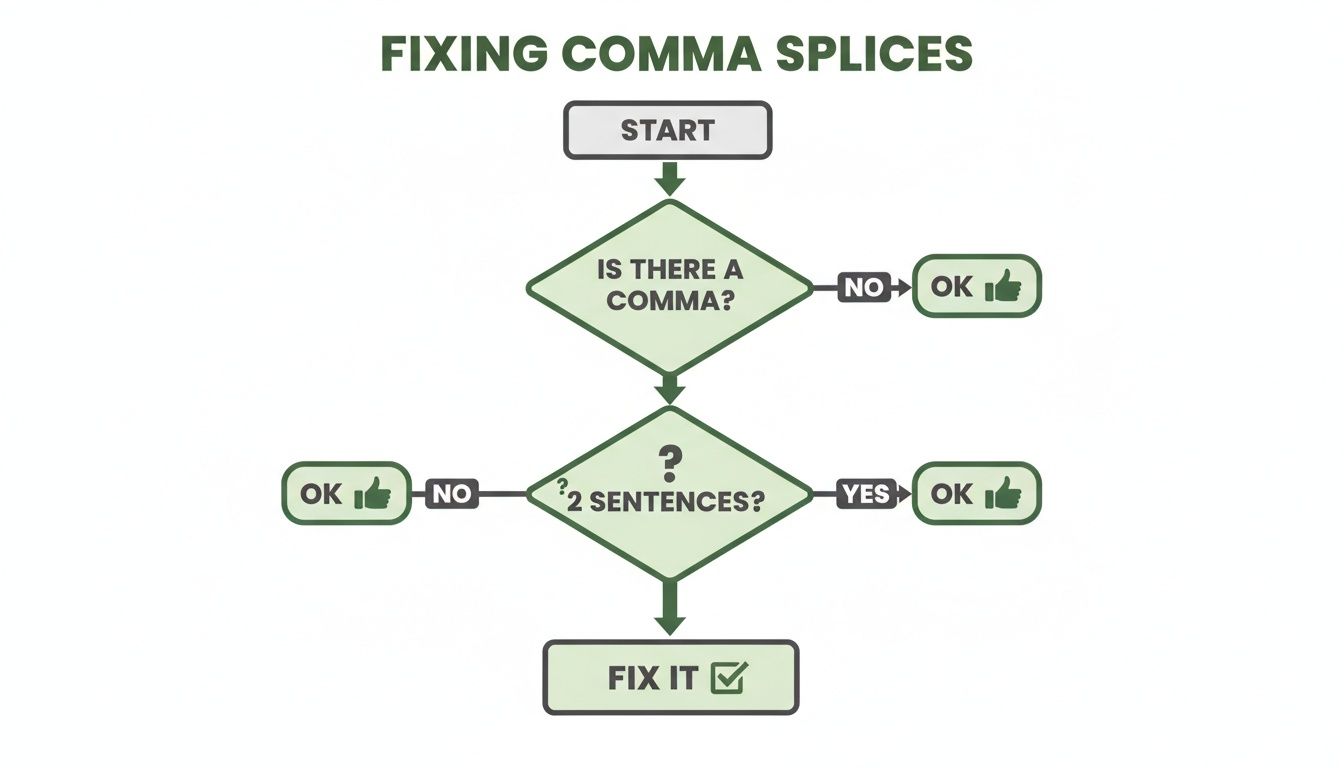
The flowchart breaks down the diagnostic process: if you have a comma sitting between two complete sentences, you've got a comma splice that needs fixing.
The good news is that fixing a comma splice is usually straightforward. Here are the three most common and effective ways to do it.
Three Simple Ways to Correct a Comma Splice
| Correction Method | Example of a Comma Splice | Corrected Sentence |
|---|---|---|
| Use a Period | The presentation was a success, everyone was impressed. | The presentation was a success. Everyone was impressed. |
| Use a Semicolon | She finished her research, he started writing the paper. | She finished her research; he started writing the paper. |
| Add a Conjunction | We need to leave now, we will be late for the meeting. | We need to leave now, or we will be late for the meeting. |
Each of these methods creates a grammatically sound structure, ensuring your message is delivered clearly and effectively.
A good comma splice checker automates this entire diagnostic process for you. Think of it as a safety net, catching these common mistakes before your writing ever reaches its intended audience. It helps ensure your ideas are presented with the structural integrity they deserve, making your message that much more powerful.
How to Spot Coma Splices Without a Tool
Before you start leaning on a comma splice checker, it's worth investing some time in honing your own editing instincts. When you learn to spot these errors yourself, you build a foundational skill that makes any automated tool much more useful. You'll actually understand why the tool is flagging something.
The real trick to finding comma splices is learning to identify independent clauses. Don't let the grammar term scare you off. An independent clause is just a fancy name for a group of words that has a subject and a verb and can stand on its own as a complete sentence.
Put simply, an independent clause is a complete thought. If you can put a period at the end of a chunk of your sentence and it still makes perfect sense, you've got an independent clause.
Master the Two-Sentence Test
The easiest and most reliable manual check I know is what I call the "two-sentence test." It's a quick and dirty diagnostic you can run whenever a comma feels a little out of place.
Here’s how you do it: find the comma in question and swap it out for a period. Now you have two separate sentences. Read them aloud.
- Does each part make complete sense by itself?
- Can you find a subject and a verb in each one?
If you answered "yes" to both, congratulations—you've just sniffed out a comma splice. That little comma is trying to do the job of a period, and it just can't handle the pressure.
Pro Tip: Reading your work aloud is the secret weapon of good self-editing. Your ears will catch clunky phrasing and run-on sentences that your eyes simply glide over. It makes the two-sentence test ten times more effective.
Let's look at a classic example from a business email: The team submitted the final draft, the project manager approved it immediately.
When we apply the test, we get two new sentences:
- The team submitted the final draft. (Yep, that’s a complete sentence.)
- The project manager approved it immediately. (This one works on its own, too.)
Since both parts can stand alone, the original sentence is a comma splice. Getting a handle on this is the first step when you learn how to rewrite a sentence for better flow and clarity.
Watch for Common Comma Splice Traps
Certain words are magnets for comma splices because they feel like they should connect sentences. These culprits are known as conjunctive adverbs or transitional phrases, and they trip up writers all the time by tricking them into using a comma where something stronger is needed.
Keep a sharp eye out when you use words like these:
- However: The data looked promising, however, we needed more information.
- Therefore: Our competitor launched a new campaign, therefore, we must respond quickly.
- Furthermore: The report is complete, furthermore, it includes the latest sales figures.
In every one of these examples, the word creates a logical bridge between two complete thoughts. But a comma by itself just isn't strong enough. You either need a semicolon before the connecting word or you have to break it up into two distinct sentences.
When you train yourself to spot these traps manually, you become a much more confident editor. Then, when you do use a comma splice checker, you can evaluate its suggestions with an expert eye, knowing the grammar rules that drive them. That blend of human skill and smart technology is how you get to truly polished writing.
Choosing the Right Comma Splice Checker
It seems like there's a new grammar checker popping up every week, doesn't it? From simple browser extensions to sophisticated AI writing platforms, the market is flooded with options. This boom makes perfect sense, of course. With so much of our work and communication happening online, the need for clear, professional writing has never been greater.
The numbers back this up. The online grammar checker market was valued at USD 1.22 billion in 2024 and is expected to more than double by 2033. It’s clear that people are looking for reliable tools to help them put their best foot forward. To find the right one for you, you’ll need to look past basic spell-checking and focus on what really matters.
Look for Contextual Understanding
The best tools have moved beyond rigid, textbook grammar rules. A truly great comma splice checker can actually understand the context of your sentence. It knows the difference between a genuine mistake and a deliberate stylistic choice, which is a lifesaver for anyone doing creative or informal writing where the rules are often bent for effect.
This kind of contextual intelligence is what separates the good from the great. A simplistic checker might just flag any comma followed by a subject, but a smarter tool can tell the difference between these two sentences:
- Error: The report is finished, we can send it now.
- Correct: The report is finished, so we can send it now.
That little conjunction "so" makes all the difference, and it’s a nuance that a basic checker can easily miss.
Prioritize Privacy and Security
Think about what you're writing. Is it a sensitive business proposal? A confidential research paper? A marketing plan for a new product? Where your text goes matters, and a lot of free online tools make a habit of storing, analyzing, or even sharing your data to train their AI models. That's a huge privacy risk.
A top-tier comma splice checker should offer a no-storage policy, processing your text in real-time without ever saving it to a server. This ensures your work remains completely private and secure, giving you peace of mind to edit any document without hesitation.
Before you commit to a tool, look for one that is upfront and clear about its commitment to your data privacy. For professionals, academics, or anyone handling confidential information, this isn't just a nice-to-have feature—it's essential.
Find a Tool That Humanizes Text
In an era where AI-generated content is everywhere, just fixing grammar isn't cutting it anymore. We’ve all seen drafts from tools like ChatGPT that are technically correct but feel robotic, awkward, or just… bland. They are also often filled with subtle mistakes, including comma splices that a human editor would catch in a second.
This is where the best modern tools shine. Your ideal comma splice checker should do more than just correct errors; it should help you humanize the text. It should offer smart suggestions to improve the flow, tighten up your sentence structure, and swap out clunky phrasing for something more natural.
This dual capability is a game-changer, helping you turn a sterile AI draft into a polished, engaging piece of writing that actually connects with your audience. To see how different tools stack up, check out our guide on the best grammar checker software. It's this humanizing touch that makes a checker an indispensable partner in any modern writing workflow.
Putting Your Comma Splice Checker to Work
So you've found a solid comma splice checker. Now for the important part: actually using it. It's so tempting to treat these tools like a magic wand, where you just click "accept all" and call it a day. But from my experience, the best way to use a checker is to think of it as a knowledgeable writing partner—an assistant that flags potential problems for you to review.
Instead of blindly trusting every suggestion, take a second to really look at what it’s pointing out. This small shift in how you approach it can turn editing from a boring chore into a chance to actually learn. You’ll start spotting your own recurring mistakes and build that gut feeling for grammar that makes you a stronger writer in the long run.
This is especially true if you’re cleaning up drafts generated by AI. Those texts can often look correct on the surface but feel clunky or unnatural. A checker will catch the obvious grammatical slip-ups, but it takes your human judgment to make sure the final piece actually sounds like a person wrote it.
From Detection to Correction
A good workflow isn't just about finding errors. It’s about understanding why something is wrong and then picking the best way to fix it. When your comma splice checker flags an issue, don’t just hit accept. Pause and weigh your options.
- Does it suggest a period? This is usually the simplest and cleanest fix. It creates two separate, punchy sentences. But what if the ideas are too closely linked for a full stop?
- How about a semicolon? A semicolon can be a more elegant solution, creating a sophisticated bridge between two related thoughts.
- Or maybe a conjunction? Sometimes, adding a word like "and," "but," or "so" is the best move because it clarifies the exact relationship between the two ideas.
Let’s walk through a real-world example:
- The Original Splice: The marketing data is in, the team is analyzing the results now.
Your checker might offer a few different ways to correct this:
- Option 1 (Period): The marketing data is in. The team is analyzing the results now. (This is clear and direct.)
- Option 2 (Semicolon): The marketing data is in; the team is analyzing the results now. (This connects two very closely related actions.)
- Option 3 (Conjunction): The marketing data is in, and the team is analyzing the results now. (This shows a simple, logical sequence.)
By thinking through these choices, you stay in control of your writing's tone and flow. The tool is your guide, not your boss.
Your goal isn’t just to squash errors. It's to make deliberate choices that improve how your writing reads. A comma splice checker gives you the options; you provide the final creative judgment.
Integrating the Checker into Your Routine
To really get the most out of your tool, it needs to be part of a structured proofreading process. My advice? Don't run the checker while you're still writing your first draft—that’s a surefire way to kill your creative momentum. Instead, save it for the editing phase.
Here's a simple, practical sequence that works for me and many other writers:
- Do an Initial Read-Through. First, just read your draft yourself. Look at the big picture: Does the argument make sense? Is the structure logical? Is it clear?
- Run the Comma Splice Checker. Now, unleash the tool. Let it hunt down the grammatical gremlins and punctuation problems. Pay special attention to any comma splices it flags.
- Read It Out Loud. This is the secret weapon of good editing. Reading your work aloud helps you catch awkward phrasing, clunky sentences, and unnatural rhythms that software will almost always miss.
There's a reason the market for these tools is exploding. The proofreading and grammar checker sector was valued at USD 467.8 million in 2024 and is expected to hit USD 1,257.84 million by 2033. A huge driver of this growth is the rise of AI assistants, which often produce drafts where comma splices are a common flaw, showing up in an estimated 15-20% of professional emails. You can read the full research about proofreading tool market trends to see the full picture.
This three-step workflow blends the efficiency of automation with the critical thinking of a human editor. The result is a final piece that's not just error-free, but truly polished and persuasive.
Advanced Proofreading for Flawless Writing
A good comma splice checker is a fantastic first line of defense, but seasoned writers know that technology is just one piece of the puzzle. To really make your work shine, you need to combine the efficiency of a great tool with your own human intuition. These are the tried-and-true techniques I use to bridge that gap.
One of the most effective proofreading tricks is also one of the simplest: read your work out loud. I can't tell you how many times my ears have caught what my eyes missed—awkward phrasing, clunky sentences, or run-ons that just sound breathless. Software is great at flagging rule violations, but it can’t always tell you if a sentence just feels off.
Beyond the Screen Reading Techniques
To spot those deeper, more ingrained errors, you have to trick your brain. Your mind is so efficient at auto-correcting small mistakes that you often see what you meant to write, not what's actually on the screen.
Here are a couple of pro-level tricks to shake things up:
- Read It Backward: No, not word-for-word. Start with the very last sentence of your article and read your way to the top, one sentence at a time. This simple change yanks each sentence out of its context, forcing you to judge it purely on its own structure. Comma splices and other grammatical hiccups suddenly become impossible to ignore.
- Change the Scenery: This is another favorite of mine. Print your document out. If you can't do that, change the font, text size, and even the color on your screen. Any small shift in the environment makes the text look unfamiliar, helping you catch mistakes your brain had been skimming right over.
The single best editing tool might just be time. Stepping away from your draft for a few hours—or even a full day—allows you to return with a fresh perspective. Errors you were blind to before will suddenly jump off the page.
Creating a Hybrid Editing Workflow
The most powerful approach is to blend these manual checks with the speed of your comma splice checker. For anyone looking to integrate technology into their editing, learning how to utilize AI for writing can be a huge help in polishing your final draft. This hybrid workflow gives you the best of both worlds: technical accuracy and stylistic flair.
There's a reason the market for these tools is booming. Grammar check software was valued at USD 1,291.2 million in 2021 and is projected to hit USD 3,879.01 million by 2033. This explosion is partly driven by the rise of AI-generated content, where comma splices pop up in an estimated 22% of unedited drafts, making a reliable checker more important than ever.
So, how do you put it all together? Start by running your checker to catch the easy stuff—the typos, basic punctuation errors, and obvious comma splices. After you’ve reviewed the tool’s suggestions, it's time to switch to the manual methods like reading aloud. This two-pronged attack ensures nothing slips through the cracks, leaving you with content that's clean, compelling, and error-free.
A Few Lingering Questions About Comma Splices
Even with a great comma splice checker in your toolkit, a few questions always seem to come up. Getting these sorted out will help you edit with more confidence and make the right calls for your writing. Let's dig into the most common ones.
Are Comma Splices Always a Mistake?
In almost every professional or academic setting, the answer is a hard yes. Comma splices are flagged as grammatical errors because they smash two complete thoughts together incorrectly. This can trip up your reader and make your writing seem less credible. If you're working on anything important—a business proposal, a research paper, a client email—you need to hunt them down and fix them.
But there's a tiny exception: creative writing. You'll sometimes see seasoned authors use a comma splice on purpose. It’s a stylistic choice, often to create a rushed, stream-of-consciousness feel. This is a pro-level move, though, and it's done with clear intent.
The bottom line: Unless you're a novelist intentionally breaking the rules for artistic effect, treat every comma splice as an error. For 99% of writing, grammatical correctness is the goal.
Can a Checker Really Catch Every Single Grammar Error?
A good grammar checker is an amazing assistant, but it’s more of a co-pilot than an autopilot. These AI-powered tools are fantastic at spotting technical mistakes—comma splices, misplaced punctuation, and subject-verb agreement issues are right in their wheelhouse.
Where they can fall short is with the human element. They might miss the subtle nuances of your tone, the specific context of your piece, or your unique voice. The best way to work is to let the checker do the first heavy lifting, cleaning up all the obvious technical errors. Then, you should always do a final read-through yourself to polish the flow and make sure it sounds like you.
How Do These Tools Handle AI-Generated Text?
AI writing tools are great for getting a first draft on the page fast, but let's be honest—their output is often riddled with small but noticeable errors. Comma splices are one of their most frequent bad habits.
This is where a solid checker becomes essential. Running that AI-generated draft through a tool designed to spot these issues is the fastest way to clean it up. But the best tools do more than just fix mistakes; they also help humanize the content. They can spot robotic phrasing and awkward sentences, suggesting changes that make the text feel more natural and engaging. It’s a crucial step to ensure the final piece doesn’t just sound correct, but also sounds human.
Ready to turn robotic drafts into writing that connects? The Natural Write platform not only catches comma splices but also humanizes your text in one click, making sure it flows naturally and sails past AI detectors. Polish your writing for free at https://naturalwrite.com.