If you need a quick originality check, Google can be surprisingly effective. Surround a distinctive snippet of your writing with quotation marks, run the search, and Google’s vast index will reveal any exact matches across public web pages. It’s a fast way to catch unintended overlap before moving on to deeper analysis.
Why Google Is Your First Line Of Defense
You already know Google Search as your go-to for research—but it doubles as a free plagiarism scanner. Premium checkers dig deeper, yet a simple search often uncovers the most blatant repeats without any subscription.
Here’s what makes Google so handy:
- Massive Coverage: Trillions of pages crawled and stored
- Instant Results: Get matches in real time
- Zero Cost: No paywall or sign-up required
When you search an exact phrase, Google is basically asking, “Have these words shown up anywhere else online?” If the answer is yes, you’ll see it right away.
The Rise Of AI And Recycled Content
AI writing assistants have grown more common, and they pull from huge pools of existing text. Occasionally, they’ll spit out passages that mirror their training data too closely. It’s rarely intentional, but it can slip into your draft.
A 2023 Copyleaks study revealed that 60% of content from GPT-3.5 showed some form of plagiarism, with many passages matching existing sources word for word. That stat underscores why a quick Google check is so valuable.
This simple search step functions as quality control. It spots recycled phrases, confirms your unique ideas, and helps you polish AI-generated drafts until they’re genuinely original.
Mastering a few of these search tricks puts you in control of your content. For authors using Google Docs, we’ve laid out the built-in plagiarism tools in our guide: https://naturalwrite.com/blog/how-to-check-for-plagiarism-on-google-docs. Whether you’re a student safeguarding your work or a marketer protecting brand integrity, Google is the first stop on your authenticity checklist.
Mastering Search Operators for Accurate Plagiarism Detection
If you really want to get good at spotting plagiarism with Google, a simple copy-and-paste won't cut it. You have to learn to "speak Google's language" by using search operators. These are special commands that turn a basic search into a focused, almost forensic investigation. They let you tell Google exactly what to look for, cutting through the noise to find potential copies with surprising accuracy.
Think of it this way: a normal search is like casting a wide net, hoping you catch something. Using operators is like spear-fishing—you're targeting a specific result.
This diagram shows a simple workflow I often use when checking AI-generated content before it goes live.
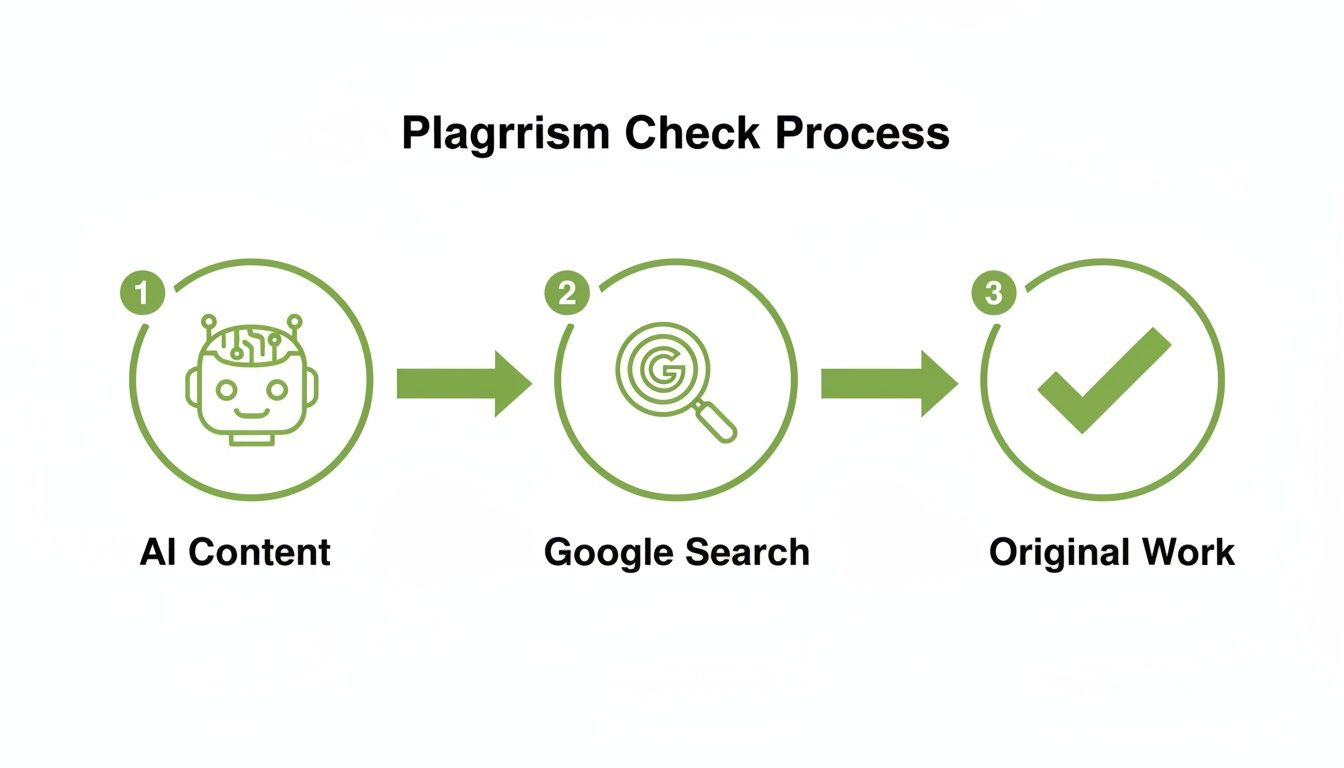
As you can see, a quick Google check is a critical middle step between the AI draft and the final, original piece of work.
Using Quotation Marks for Exact Matches
Your number one tool in this process is the double quotation mark (" "). When you wrap a snippet of text in quotes, you're telling Google to find only pages that contain that exact phrase, with the words in that exact order. It’s the fastest way to catch blatant, word-for-word copying.
I’ve found the sweet spot is to grab a distinctive phrase of about 7-10 words. If you go too short, you’ll get tons of irrelevant results for common sayings. Go too long, and you might miss a match where just a couple of words were changed.
For instance, say you're checking this sentence: "The intricate web of digital marketing requires a multi-faceted approach to audience engagement." You'd pop this into the search bar:
"intricate web of digital marketing requires a multi-faceted approach"
If that exact string of words exists anywhere on a public website, Google will serve it right up. This trick is incredibly useful for finding content that has been scraped from other blogs or lifted from academic papers.
Refining Your Search with Advanced Operators
While quotes are your go-to, combining them with other operators gives you much more control. This is how you start filtering out false positives and catching more cleverly disguised copies.
The Minus Sign (-): This is perfect for excluding results from a specific website. Let’s say you’re checking a new blog post to see if it’s been stolen and republished elsewhere. You’d search for a unique phrase from your article but exclude your own site, like this:
"your exact phrase" -yoursite.com.The Wildcard Operator (*): The asterisk is a placeholder for one or more words. This is brilliant for finding sentences that have been slightly rephrased. If you suspect a sentence has been tweaked, you could try searching
"The intricate web of * requires a multi-faceted approach". Google will then show you results where words have been added, removed, or swapped out in the middle of that phrase.
Pro Tip: By stringing these operators together, you can create some powerful queries. A search like
"your unique slogan" -yourcompetitor.comcan instantly tell you if a rival has been a little too "inspired" by your marketing copy. It's a simple way to keep an eye on your intellectual property.
To make things easier, here's a quick-reference table of the most useful search operators for these kinds of checks.
Key Google Search Operators for Plagiarism Checks
| Operator | Function | Example Usage |
|---|---|---|
| " " | Finds the exact phrase | "sustainable business practices for the modern era" |
| - | Excludes a term or site | "unique marketing slogan" -yourbrand.com |
| * | Acts as a wildcard for missing words | "the future of AI * will change everything" |
These aren't just academic tricks; they're practical tools for anyone creating content. A marketer can vet a new tagline, a writer can double-check an AI-generated paragraph, and a student can ensure they haven't accidentally stayed too close to a source. Getting comfortable with these simple commands is what elevates Google from a simple search engine to a reliable, first-line plagiarism checker.
How to Analyze and Interpret Your Search Results
Okay, you’ve plugged in your text, hit search, and now you’re staring at a page of results. It’s easy to feel a jolt of panic when you see matches pop up, but don't jump to conclusions. Finding a match isn't a guilty verdict—it’s just the first step. The real detective work begins now.
The search results page itself gives you a ton of clues before you even click a link. Notice how Google often bolds your exact search phrase right in the little text snippets (the meta descriptions) under each headline? This is incredibly useful. It gives you an instant preview of how your phrase is being used on that page.
This immediate feedback is your first filter, helping you sort through the noise and figure out what’s a real problem versus what’s just a harmless coincidence.
Differentiating Matches and False Positives
Not every highlighted phrase is a sign of trouble. The goal here is to learn the difference between genuine plagiarism and what we call a false positive. I’ve learned to ask a few questions to quickly size up each match.
- Is this just a common phrase? Sentences like "For more information, contact us" or standard industry jargon will show up everywhere. It’s just the nature of language. These are classic false positives; you can safely ignore them and move on.
- Is it a properly cited quote? If the matching text on the other site is clearly in quotation marks and gives credit to the original author, that’s not plagiarism. That's just good scholarship.
- Is it a direct, uncredited lift? This is the one you’re looking for. When you find a unique, distinctive phrase of yours sitting on another website with no attribution—especially if the sentences around it look suspiciously familiar—you’ve likely found the real thing.
The context of the match is everything. A single matching phrase on a high-authority academic site is very different from seeing entire paragraphs of your work on a low-quality content farm. Your interpretation should change based on the source.
Evaluating the Source and Context
Speaking of the source, where the match appears is just as important as the text itself. Before you make a judgment call, take a second to investigate the website. A quick look at the domain can tell you a lot about the situation.
Is it a respected industry journal, a major news outlet, or some student’s personal blog? A match on a university website might mean you subconsciously used a phrase from a paper you read for research. But if your content appears on a spammy-looking site full of ads, it’s more likely your work was scraped and stolen after you published it.
Don't forget to check the publication dates. This is a game-changer. If the other article was published years before yours, it’s a pretty clear sign your phrase wasn't original to begin with. On the flip side, if their article came out after yours, you might be the one who was copied. This simple timeline check helps establish who created it first and tells you whether you actually need to go back and revise your work.
Going Beyond a Standard Web Search
A regular Google search is a great starting point, but it mostly just scratches the surface. It’s fantastic for finding copied content from blogs, news articles, and public websites. But what about the massive world of academic research and published books? That's where you need to dig a little deeper.
If you're a student, researcher, or professional writer, this is a critical step. A thorough check means making sure your work isn't just original compared to a blog post, but that it also respects the huge body of academic and literary work that already exists.
Uncover Academic Overlap with Google Scholar
Think of Google Scholar as your direct line to the academic world. It’s a specialized search engine that indexes scholarly articles, theses, dissertations, and conference papers—exactly the kind of material a standard search often overlooks.
The process is refreshingly simple. You use it just like you would a normal Google search, pasting a unique phrase from your text into the search bar and wrapping it in quotation marks. For instance, if you were vetting a sentence from a research paper, you might search for:
"the socio-economic impact of renewable energy adoption in rural communities"
If that exact wording has been used in a published paper or thesis, Google Scholar will flag it. This is an incredibly useful way to confirm your arguments are genuinely your own and that you haven't accidentally echoed the phrasing of a source you read weeks ago.
A common misconception is that academic databases are locked away from the web. While many papers live behind paywalls, Google Scholar still indexes their titles, authors, and abstracts, making them searchable and an essential tool for any serious originality check.
This is more important than you might think. Research from Plagiarismcheck.org found that matches from paid databases and scientific journals can account for 27% to 47% of plagiarism cases. That number alone shows why you can't afford to skip this step if academic integrity is a priority.
Scan Published Literature with Google Books
Your next stop should be Google Books. This tool is a goldmine, containing millions of digitized books from libraries and publishers all over the globe. The real power here is its ability to search for text inside all of those books, something a standard web search simply can't do.
The method is the same:
- Head over to Google Books.
- Pop your exact-match phrase in quotes into the search bar.
- Look through the results. Google will show you snippets from any book where your phrase appears.
This is a lifesaver for anyone writing about history, analyzing literature, or discussing established theories. It helps you spot phrases that might be common within a specific field, giving you a chance to reword your sentence or add the proper citation before you publish.
While Google's tools offer a powerful, manual way to check for plagiarism, they aren't your only option. For more exhaustive or automated scans, it’s worth it to explore dedicated plagiarism detection services like Copycat247.
Still, for a hands-on, deep-dive investigation, combining a standard search with checks on Google Scholar and Google Books gives you a really solid, multi-layered strategy. For anyone in an academic setting, this approach is conceptually similar to understanding what does Turnitin check for, as both involve scanning a diverse range of sources well beyond the public internet.
Understanding the Limitations and Best Practices
While using Google to check for plagiarism is a fantastic first step, it’s important to be honest about what it can't do. Knowing its boundaries is the key to using it effectively.
Think of Google as a powerful flashlight. It can brilliantly illuminate a massive public room, but it can’t see inside locked safes or behind closed doors.
Google’s biggest limitation is access. Its web crawlers can’t bypass paywalls, so it will miss content locked away in subscription-only academic journals or exclusive news archives. Likewise, it has zero visibility into private university databases, corporate intranets, or any document that’s never been published on the public web.
Navigating the Gray Areas and Building a Smarter Workflow
Another challenge? Clever paraphrasing. A quick search is great for catching blatant copy-paste jobs, but it can easily be fooled by reworded sentences or text run through an AI spinner. Google’s algorithm is incredibly smart, but it simply wasn't built to spot nuanced semantic similarities the way a dedicated plagiarism tool can.
With these limitations in mind, you can build a much smarter workflow. For starters, don't try to check a 5,000-word document all at once. It’s inefficient and won’t work. Instead, try strategic chunking.
- Isolate the Core Ideas: Pull out the most unique or critical sentences from the text—the central arguments—and search for those specifically.
- Spot-Check AI Content: If you're using an AI writing assistant, grab a few snippets of its raw output and check them immediately. This helps you catch recycled phrasing before you waste time editing it.
- Use it as a First Pass: Treat Google as your fast, free initial screening. If it flags something, you know you need to investigate further. If it comes back clean, you can either proceed with more confidence or move on to a specialized tool for a final, deeper check.
The goal isn't to treat Google as a definitive, all-in-one plagiarism solution. See it for what it is: an indispensable diagnostic tool that helps you spot the most obvious problems quickly, saving you time and effort down the line.
Ultimately, a truly robust approach to originality is about more than just detection. It’s about building a solid foundation of academic and creative integrity. That means knowing how to cite sources properly to avoid those unintentional mistakes that can trip anyone up.
Good habits are your best defense. For more practical strategies, check out our guide on tips for avoiding plagiarism. When you combine smart searching with ethical writing practices, you can be sure your work is always authentically yours.
Got Questions? Let's Talk Plagiarism Checks
When you start using Google to hunt down unoriginal text, a few questions always seem to pop up. Here are some straightforward answers based on years of experience, designed to help you get the most out of the process and understand what Google can (and can't) do.
Can Google Catch Every Kind of Plagiarism?
In a word, no. Google is an incredibly powerful tool, but it's not an all-seeing eye. It's fantastic at spotting direct, copy-paste jobs from publicly available websites. If someone lifted a paragraph from a blog post or an online article, a quick search will usually light it right up.
But it has some major blind spots. Google can't peek behind paywalls, so it misses content from most academic journals and subscription-only news sites. It also has zero access to private databases, like the massive archives of student papers used by universities, or any document that's never been put online.
And what about clever paraphrasing or text that's been spun by an AI? That can often fly right under the radar of a simple search. It’s best to think of Google as your first line of defense, not the final word on originality.
What Do I Do If I Find a Match?
First off, don't panic. Seeing your text somewhere else is a signal to dig deeper, not a guilty verdict. You need to figure out why it's a match.
- Is it just a common phrase? If the flagged text is a well-known idiom, a standard definition, or just industry jargon, it's almost certainly a false positive. You can probably ignore it.
- Is it a proper quote? Check if the source you found has the phrase in quotation marks or gives a clear citation. If it's a properly attributed quote, you're in the clear.
- Is it a unique, uncredited chunk of text? This is the red flag. If you find a distinctive part of your writing on another site without any credit, you need to rewrite it. This is a common trap if you're using AI writers—they sometimes regurgitate their training data a little too closely.
The goal isn't to have zero overlapping words with the rest of the internet. It's to make sure your work is fundamentally original and adds your own unique value.
Is a Google Check Good Enough for My University Paper?
It's a helpful first step, but it's definitely not enough. Universities and colleges rely on specialized software like Turnitin, which is playing a completely different ballgame.
These academic checkers compare your paper against enormous private databases that include:
- Millions upon millions of student papers submitted over the years.
- A huge library of scholarly articles, journals, and books, including everything locked behind paywalls.
- Content from major publishers that isn't available on the public web.
Google simply doesn't have access to any of that. So, by all means, run a search to catch any low-hanging fruit before you submit. But never assume a clean Google result means you'll pass your university's official check.
How Often Should I Be Checking My Work?
Building a habit of checking as you go is a smart move. There's no need to check every sentence, but it's wise to run a search at key points in your writing workflow.
I'd recommend running a quick check after you finish a big section, especially if you've been doing a lot of research. And a final, thorough check before you hit "publish" or "submit" is non-negotiable.
Here's a pro-tip: if you're working with AI writing tools, get in the habit of spot-checking snippets of the raw text they generate. It's much easier to catch and fix a borrowed phrase right away than it is after you've already woven it into your draft.
Once you're confident your text is original, the next challenge is making it sound genuinely human. Natural Write can take that stiff, robotic AI output and transform it into smooth, natural-sounding prose that sails past AI detectors. Give your drafts that final polish with a single click by trying it for free at https://naturalwrite.com.