An AI text humanizer tool is software designed to take robotic-sounding, AI-generated content and transform it into something that reads as if a person wrote it. These platforms go beyond simple synonym swapping; they rework sentence structures, enrich the vocabulary, and adjust the tone to make the text feel more natural and authentic.
The goal is to improve readability and help the content bypass AI detection systems.
How AI Text Humanizer Tools Actually Work
You know that feeling you get when you're reading something and can just tell a machine wrote it? The grammar is perfect, the facts are there, but it’s missing a human touch. It feels a bit hollow. That's where an AI text humanizer comes in. It bridges the gap between robotic efficiency and human connection.
Imagine an AI writer is like a gifted pianist who hits every note with technical precision but plays without any soul. The humanizer tool acts like a seasoned conductor, adding emotion, rhythm, and style to turn a mechanical performance into a moving piece of music. This isn't just a simple find-and-replace job; it’s a sophisticated, two-part process that involves deep analysis and clever rewriting.
The Detection Phase: Identifying AI Fingerprints
Before a single word is changed, the tool has to figure out why the text sounds artificial in the first place. It scans the content for common AI giveaways—the digital fingerprints that make machine-written text so easy to spot for both software and sharp-eyed readers.
Here are the key clues an AI text humanizer tool hunts for:
- Predictable Sentence Structures: AI models often get stuck in a rut, using the same simple sentence patterns (like subject-verb-object) over and over, which makes the writing feel monotonous.
- Low Perplexity and Burstiness: Real human writing is varied. We mix long, flowing sentences with short, punchy ones. AI text tends to be very uniform in its length and complexity, a trait known as low perplexity.
- Overly Formal Tone: AI often defaults to a stuffy, academic voice. It tends to avoid contractions, idioms, and the kind of casual language people use in everyday conversation.
A huge part of what these tools do is disrupt the statistical predictability that makes AI writing so detectable. By introducing more variety and a less uniform style, the content starts to feel like it came from an actual person.
The Rewriting Phase: Crafting a Human Voice
Once the tool has identified the AI-like patterns, its rewriting engine kicks into high gear. This is where a platform like Natural Write excels, using smart algorithms to rebuild the content without losing its core message. The technology behind this is fascinating; you can dive deeper in our guide explaining what Natural Language Processing is and how it makes these tools possible.
This flowchart gives a great visual of the simple but powerful workflow involved.
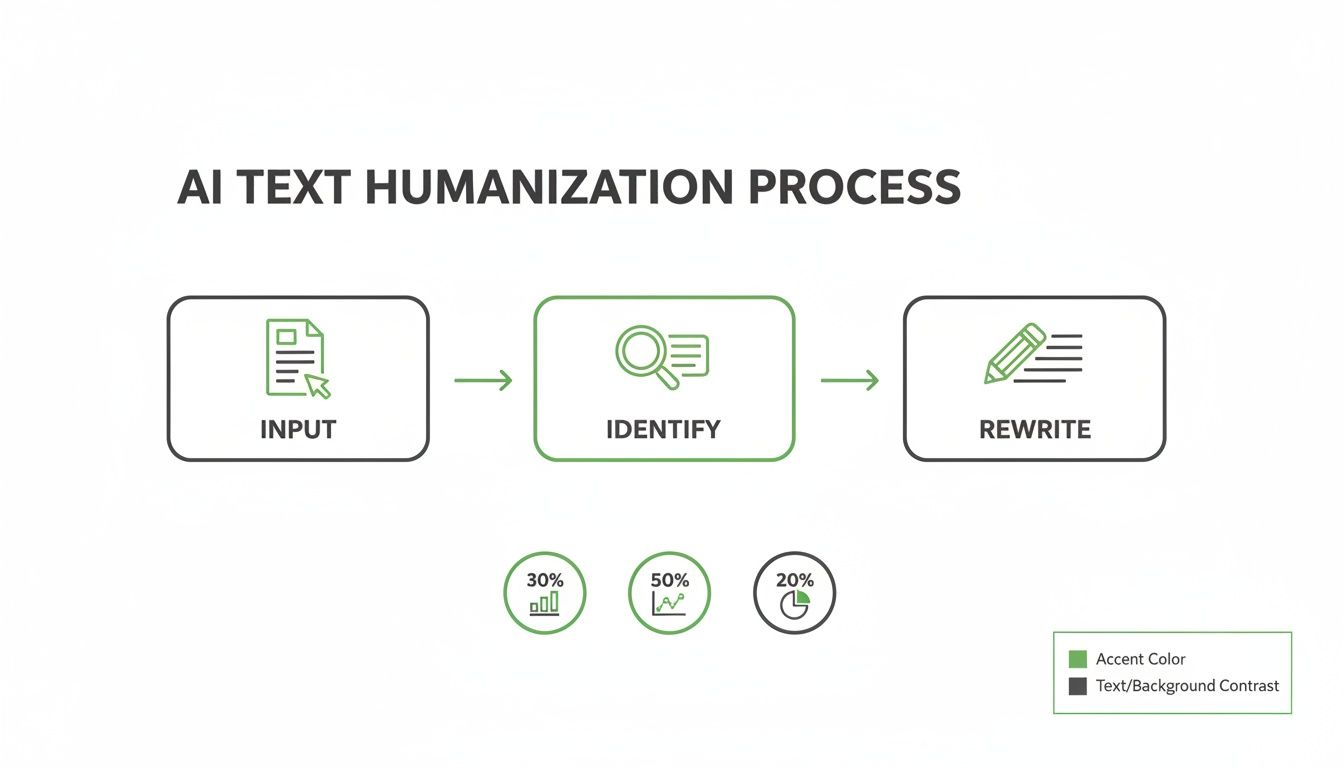
As you can see, the process flows from the initial AI-generated text, through an identification stage where robotic elements are flagged, and finally to the rewriting stage where the magic happens.
During the rewrite, several things are happening at once:
- Sentence Restructuring: The tool will start varying the rhythm by combining short, choppy sentences or breaking apart long, complex ones to create a more engaging flow.
- Vocabulary Enhancement: It swaps out repetitive words and bland, generic terms for more precise and interesting language that better fits the context.
- Tone Adjustment: This is all about adding personality. The tool might add contractions (like "it's" instead of "it is"), use a more active voice, and weave in phrases that sound like something a real person would say.
In the end, a good AI text humanizer doesn't just shuffle words around. It tears down the robotic scaffolding of the original text and rebuilds it with the nuance, cadence, and genuine feel of human writing.
Why Bother Humanizing AI-Generated Content?

Hitting the 'generate' button on an AI writer is just the start of the journey, not the finish line. In a world now flooded with machine-generated text, making a real connection with your audience is more important—and harder—than ever. Raw AI output, while fast, often falls flat and can create some serious headaches for creators.
Simply put, unedited AI content is a gamble. It can get flagged by sophisticated AI detectors, or worse, it can completely fail to connect with the very people you're trying to reach. That's why using an ai text humanizer tool like Natural Write isn't just a nice-to-have; it's a crucial part of the modern creator's toolkit.
Dodging Advanced AI Detection
One of the most immediate hurdles with raw AI text is getting flagged by detection software. Tools like Turnitin, GPTZero, and Originality.ai are getting scary good at spotting the tell-tale statistical patterns and predictable sentence structures that scream "a robot wrote this."
For a student, this could mean an essay is flagged for inauthenticity, leading to serious academic consequences. For a marketer, it means their content might get devalued by platforms that prioritize human-first content. An ai text humanizer tool carefully rewrites the text to smooth out those digital fingerprints, helping it fly under the radar.
The global AI text generator market was valued at $534.78 million in 2024 and is projected to hit $2.2 billion soon. While 41% of users report big productivity gains, some workflows see detectors flagging up to 78% of ChatGPT content. This makes humanization a non-negotiable step.
Making a Real Connection with Readers
Beyond just avoiding detection, there's the all-important human element. Raw AI text often has a sterile, almost clinical tone that just doesn't resonate. It lacks the personality, the unique rhythm, and the subtle emotional cues that make a piece of writing truly compelling.
Think about it: you'd instantly delete a marketing email that felt cold and impersonal. You'd click away from a blog post that reads like an instruction manual. Humanizing your content bridges that gap, infusing it with a natural flow and a relatable voice that turns passive skimmers into an engaged audience.
Boosting SEO and Content Authenticity
Search engines have wised up. They're now heavily focused on rewarding content that shows real experience, expertise, authoritativeness, and trustworthiness—what's known as E-E-A-T. The goal is to surface authentic, helpful content made for people, not just for climbing the ranks.
Robotic, generic-sounding content is a dead end. To really stand out and prove your content isn't just another AI-spun article, you need to internalize the principles in the E-E-A-T Manifesto for Content Creators. An ai text humanizer tool is a great starting point, helping you refine your text to sound more genuine and authoritative.
To put it plainly, the choice between using raw AI output and humanized content has clear consequences.
Risks of Using Raw AI Text vs Benefits of Humanized Content
This table breaks down the challenges you face with unedited AI text versus the advantages you gain from taking that extra step to humanize it.
| Challenge with Raw AI Text | Benefit of Humanized Content |
|---|---|
| High risk of being flagged by AI detectors | Passes AI detection tools much more reliably |
| Robotic tone bores or alienates readers | Engages the audience with a natural, human voice |
| Can hurt long-term SEO performance | Aligns with Google's human-first content standards |
| Lacks a unique brand personality and voice | Strengthens your brand identity and connection |
Ultimately, humanizing AI-generated content is about more than just dodging a penalty flag. It's about protecting your credibility, building real trust with your audience, and making sure your message actually lands with impact. It’s how you turn a functional but forgettable block of text into something truly worth reading.
A Practical Walkthrough of the Natural Write Tool
Theory is great, but seeing an ai text humanizer tool in action is what really matters. Let’s walk through the exact steps of taking robotic-sounding text and turning it into something genuinely human using Natural Write. You'll see just how straightforward it is.
The entire process is built to be simple, usually just a few clicks from start to finish. Whether you're a student putting the final touches on a paper or a marketer trying to connect with an audience, this workflow helps your message land with authenticity.
Step 1: Paste Your Original AI Text
First things first, grab the AI-generated text you want to fix. This could be a few paragraphs from ChatGPT, a blog post outline from another AI writer, or anything in between.
Head over to the Natural Write platform and paste your content right into the main editor. The interface is clean and uncluttered, so you can get going immediately without fumbling around.
This image shows the clean layout of the Natural Write interface where you'll paste your text.
As you can see, the large input box on the left is waiting for your text, with the main options clearly visible.
Step 2: Run the Built-In AI Checker
Before you change a single word, you need a baseline. How robotic does your text actually sound to an AI detector? Natural Write has a built-in AI checker to give you a quick, honest answer.
With your text in the box, just click the "Check for AI" button. Within seconds, the tool scans your content and gives you an AI detection score. This number shows the probability that it would get flagged by common algorithms like GPTZero or Turnitin. Think of it as your "before" photo—it clearly shows why humanization is necessary.
Step 3: Use the One-Click Humanize Feature
This is where the magic happens. Once you have your initial score, hit the "Humanize" button. This engages Natural Write’s sophisticated algorithms, which get to work doing a few key things we talked about earlier:
- It restructures sentences to give the text a much more natural rhythm.
- It enhances the vocabulary, replacing those common AI buzzwords with more interesting choices.
- It adjusts the tone to feel more personal and less like a machine wrote it.
The point of this one-click process isn’t just to fly under the radar of AI detectors. It's about a fundamental improvement in the writing itself. The tool intelligently rephrases your content to make it more compelling and easier to read, all without losing your core message.
Step 4: Review and Finalize Your Content
After the humanizer does its work, the new, improved text appears in the output window. Now comes the most important step, and it’s all you: read it carefully.
The ai text humanizer tool does all the heavy lifting, but your own voice is what makes the content truly yours. Make a few small tweaks to ensure the output perfectly captures the style you're going for. Double-check that all your key points are accurate and adjust any phrase that doesn't feel quite right to you. This final, personal review is what turns a well-written piece of text into your content.
Ready to see it for yourself? You can explore the full capabilities of the Natural Write humanize AI tool and give this four-step process a try.
Real World Before and After Examples
The theory is great, but the proof is in the pudding. Talking about "improving flow" or creating a "natural cadence" is one thing; seeing it happen is another. Let's get practical and look at a few examples to see how a tool like Natural Write transforms raw AI output into something that genuinely reads like a person wrote it.
We'll take a look at three common scenarios: a paragraph from a student's essay, a snippet from a marketing email, and the opening of a blog post. For each one, I’ll show you the before and after, along with the AI detection scores, so you can see the difference in black and white.
Example 1: Academic Essay Paragraph
Students often use AI to get a first draft on the page, but that robotic, predictable text can easily get flagged by detectors like Turnitin. The goal isn't just to avoid detection but to shape the AI's factual output into a voice that sounds both academic and authentic.
Before: AI-Generated Text
The Industrial Revolution, which commenced in Great Britain in the late 18th century, was a pivotal period of economic and social change. The mechanization of production processes, particularly in the textile industry, resulted in a significant increase in manufacturing output. Consequently, this led to widespread urbanization as populations migrated from rural agrarian areas to burgeoning industrial centers in pursuit of employment opportunities. The societal structure was irrevocably altered by these developments.
- AI Detection Score: 92% AI-Generated
You can see the problem right away. It's technically correct but completely sterile. The phrasing is formulaic ("pivotal period," "consequently, this led to"), and the sentences all have a similar, monotonous rhythm. It just doesn't sound like a real person's analysis.
After: Humanized by Natural Write
Kicking off in Great Britain during the late 1700s, the Industrial Revolution marked a profound shift in both economic and social landscapes. With the mechanization of production, especially within the textile sector, manufacturing output soared. This boom fueled a massive wave of urbanization, drawing people away from rural farm life and into rapidly growing industrial hubs for work. These changes fundamentally reshaped the very fabric of society.
- AI Detection Score: 4% AI-Generated
What a difference. The humanized version feels much more alive. It varies the sentence structure, uses stronger verbs like "soared" and "fueled," and just flows better from one idea to the next. All the essential information is still there, but it’s presented with a confident, human voice.
Example 2: Marketing Email Snippet
In marketing, you live and die by your ability to connect with people. A robotic email is a deleted email. A personal one gets opened and read. This example shows how an AI text humanizer tool can breathe some life into promotional copy, making it far more compelling.
Before: AI-Generated Text
Our new software product is now available for purchase. It is designed to optimize your workflow and increase your overall productivity. We believe its features will provide substantial value to your business operations. You are invited to explore the product page to learn more about its capabilities.
- AI Detection Score: 88% AI-Generated
This is as dry as it gets. It reads like a formal announcement, not a persuasive message. It lists facts without tapping into any emotion or creating a sense of excitement.
After: Humanized by Natural Write
Your team's workflow is about to get a major upgrade. We designed our new software to cut through the busywork and help you get more done, faster. Think of it as the key to unlocking serious value for your business. Ready to see how it works? Take a closer look at what it can do for you.
- AI Detection Score: 7% AI-Generated
The impact is immediate. The rewritten version speaks directly to the reader ("Your team's workflow"), uses punchy, active language ("cut through the busywork"), and ends with a friendly, engaging question. It turns a bland notification into a genuinely interesting invitation.
Example 3: Blog Post Introduction
A blog post intro has one job: grab the reader by the collar and make them want to read on. AI-generated intros often fall flat because they're too generic and lack a strong, narrative voice.
This need for genuine-sounding content is fueling a massive industry boom. The AI writing market is on track to hit $2.74 billion in 2026 and is projected to skyrocket to $18.27 billion by 2035. With ChatGPT users alone sending 18 billion messages a week, the sheer volume of AI content is staggering, which makes tools that can add a human touch more crucial than ever. You can learn more about the explosive growth of AI writing tools in this report.
Before: AI-Generated Text
The concept of remote work has gained significant traction in recent years. This article will explore the primary benefits and challenges associated with distributed teams. We will delve into topics such as productivity, team collaboration, and work-life balance for professionals operating outside of a traditional office environment.
- AI Detection Score: 95% AI-Generated
After: Humanized by Natural Write
Is the traditional office officially a thing of the past? It seems like everyone is talking about remote work, but building a successful distributed team is more than just letting people work from home. This guide dives into what really works—and what doesn't—when it comes to productivity, collaboration, and finding that sweet spot between work and life.
- AI Detection Score: 5% AI-Generated
The humanized intro pulls you in right away with a question. It uses conversational phrases ("sweet spot") and makes a clear promise to the reader about what they'll learn. It sets a relatable, engaging tone that makes you want to keep scrolling.
As you can see, an AI text humanizer tool does more than just help bypass detection—it's a seriously powerful editing partner for making your writing clearer, more engaging, and ultimately, more effective.
Who Really Needs an AI Text Humanizer?
Just about anyone who writes can get something out of an ai text humanizer tool, but for some folks, it’s practically a necessity. These tools are the perfect bridge between a clunky first draft from an AI and a polished final piece that actually connects with a human reader.
The real magic is in adding that layer of authenticity—the nuance and rhythm that AI, on its own, just can't quite nail. Let's look at who stands to gain the most by adding a tool like Natural Write to their process.
Students and Academics
In academia, your voice and integrity are everything. Using AI to help with research is one thing, but turning in a raw AI-generated paper can set off all sorts of alarms with tools like Turnitin. The goal isn't to cheat the system; it's to use AI as a starting block without sacrificing your own scholarly voice.
This is where an ai text humanizer tool comes in clutch. It helps students:
- Find Their Tone: It smooths out the stiff, overly formal language of AI, helping to shape it into an academic tone that sounds like an actual student, not a robot.
- Clarify Complex Ideas: The tool is great at untangling convoluted sentences, making your arguments sharper, clearer, and far more persuasive.
- Maintain Integrity: By reworking an AI draft, you're ensuring the final submission truly reflects your own thinking, just expressed more effectively.
Marketers and Copywriters
Let's be honest, marketing is all about human connection. A generic, robotic ad or email just doesn't work. It won't grab attention, and it definitely won't inspire anyone to click "buy." Marketers need copy that speaks directly to a customer's problems and aspirations in a genuine, convincing way.
Consider this: by 2026, a massive 90% of content marketers will likely use AI in their daily work. It already saves them an average of 2.2 hours per week and can make them 40% more productive. The catch? AI-generated text often feels hollow and can be flagged by detection tools. This is precisely where humanizing your content becomes a marketer's secret weapon.
For marketers, an AI humanizer is more than an editing tool; it's a conversion tool. It transforms feature-dump copy into benefit-driven stories that resonate emotionally and build brand trust.
Bloggers and Content Creators
For bloggers and anyone creating content online, it's a constant battle for engagement and SEO. AI-generated articles can feel bland and repetitive, which is a killer for building a loyal audience and ranking well on Google. Creators are always looking for an edge, and their toolkit is a big part of that.
Knowing what's out there, from writing assistants to polishers, is key to staying ahead. A solid guide on the best tools for content creators can be a huge help. An ai text humanizer tool specifically helps creators by:
- Improving Readability: It breaks up those monotonous, AI-ish sentence structures, making the content flow better and keeping readers on the page longer.
- Injecting Personality: It lets you weave your own unique voice and style back into an AI-assisted draft, making sure your brand feels like you.
- Boosting SEO: By making content sound more natural and human-centric, you're giving search engines exactly what they want: authentic, valuable information.
Whether it’s an essay, an ad campaign, or your next viral blog post, this kind of technology provides that all-important finishing touch.
Using AI Humanizer Tools Ethically and Effectively
An ai text humanizer tool is a powerful ally in the writing process, but like any good tool, it's all about how you use it. The real goal isn't about fooling detectors or passing off work that isn't yours. It's about taking your own ideas and making them clearer, more engaging, and ultimately, more impactful.
Think of it as a creative partner. The AI provides a refined draft, but you’re the one who brings it to life. This means the AI-generated text is just the beginning—the raw clay you need to shape with your own knowledge, style, and perspective. Always take a moment to fact-check the output and, most importantly, inject your own voice into the final piece.
A Framework for Responsible Use
To get the most out of these tools while maintaining your integrity, it helps to have a clear set of ground rules. This way, you can be sure you're enhancing your work, not misrepresenting it.
Here are a few essential do's and don'ts to keep in mind:
- Do use the tool to polish your first drafts and break through a stubborn case of writer's block.
- Don't submit humanized text for an academic assignment without checking your institution's policies, as it could be considered a violation of academic integrity.
- Do double-check every statistic, claim, and piece of data the AI includes.
- Don't ever use the tool to generate content that is intentionally misleading or deceptive.
Following these simple guidelines keeps you in control, ensuring the final product is genuinely yours. If you're looking for more tips, our post on how to avoid AI detection dives deeper into strategies that align with these ethical principles.
Your Privacy Is Our Priority
Whenever you put your text into an online tool, you have to wonder: where does my data go? It's a huge concern, especially when you're working on sensitive essays, confidential marketing plans, or personal documents. You need to know your work isn't being saved or repurposed without your permission.
At Natural Write, we built our entire platform with privacy at its core. Our system processes and humanizes your text on the fly, and that’s it. We do not store your data, so your work stays yours—confidential and secure.
This privacy-first approach means you can use our ai text humanizer tool without a second thought. Whether you’re a student putting the finishing touches on a thesis or a professional drafting a sensitive email, your content is handled securely. You can focus on your writing, not on your data.
Common Questions About AI Text Humanizers

As you start to get the hang of using an ai text humanizer tool, you're bound to have some questions. It’s only natural. Getting straight answers will help you use platforms like Natural Write confidently, knowing exactly what they’re capable of. Let’s tackle some of the most common ones.
Can a Humanizer Guarantee My Text Passes Every AI Detector?
The short answer is no. No tool can promise a 100% guarantee that your text will evade every single AI detector out there. The detection algorithms are always evolving, just like the rewriting technology is. A good humanizer dramatically improves your odds by breaking up the predictable statistical patterns that detectors are trained to find.
Think of it as giving your writing a more organic, human-like rhythm that’s far less likely to set off red flags. That said, the smartest way to use these tools is to treat the output as a strong first draft. Your own final review and personal touch are what truly make the text yours.
Is Using an AI Humanizer Ethical for School or Work?
This is a big one, and it really comes down to how and why you're using it. If you're using an ai text humanizer tool to clean up your own thoughts, make your writing clearer, or just get past a bout of writer's block, most would agree that's perfectly fine. It’s no different than using a sophisticated grammar tool.
The ethical line is crossed when a tool is used to pass off AI-generated content as your own original work, especially in an academic setting where that's against the rules. Always, always check your school or company's policies on AI tools. The goal should be to enhance your work, not to deceive.
How Much Does the Tool Change My Original Meaning?
A well-built ai text humanizer tool is designed to be a stylist, not an author. Its purpose is to change how you say something—the sentence structure, word choice, and flow—without altering the core message. It’s all about making your original points land with more impact.
Even so, you should always give the final output a thorough read-through. Make sure the new wording still captures the nuances you intended and that nothing important got lost in translation. This simple check ensures the final text sounds both natural and stays true to your original idea.
Ready to transform your AI text into clear, engaging, and natural-sounding content? Natural Write offers a free, powerful, and privacy-focused solution. Try our AI text humanizer tool today!